Subscribe
I’ve discovered the joys of RSS feeds yesterday. Thanks -again- to the incredible people at WordPress it’s very easy to subscribe to my blog.
I’m a Google lover as well as a WordPress devotee, so I checked the way Google handles RSS feeds. If you know all about this, just add http://www.visual-art-research.com to your Google Reader.
If you are a novice, like me, this is the way to go:
At your Google page, check ‘more’ and click on ‘reader’
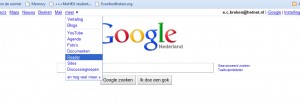
In reader, click ‘add a subscription’ then copy-paste http://www.visual-art-research.com in the box and you’re all set.
I will look into the RSS thing a bit more. I want to know, for example, how to add the little orange icon to my blog that allows you to subscribe to it with one mouseclick. Not that I want the icon, it looks hideous. But it is so recognisable. Functionality or aesthetics, I wonder which will win.
But other things to do today & tomorrow, so my curiosity will have to be put on the back burner for the moment.
Later: What I’ll do is that I will post this info as a page, to make it more accessible.
| « Eggs interface | <-- previous post | next post --> | Receipe » |
|---|